



Vibe Coding is a new, AI-powered method of software development. While traditional coding involves writing commands line by line in a programming language, vibe coding is dialog-based. The source code is generated through dialogue with an AI assistant, which users instruct via prompts. This article provides an overview of how vibe coding works, the tools used, and the advantages and disadvantages.
What Is Vibe Coding?
The term was coined in 2025 by AI researcher and OpenAI co-founder Andrej Karpathy. Vibe coding is a method of software development in which users describe their requirements in natural language, and an AI assistant generates code based on those requirements.
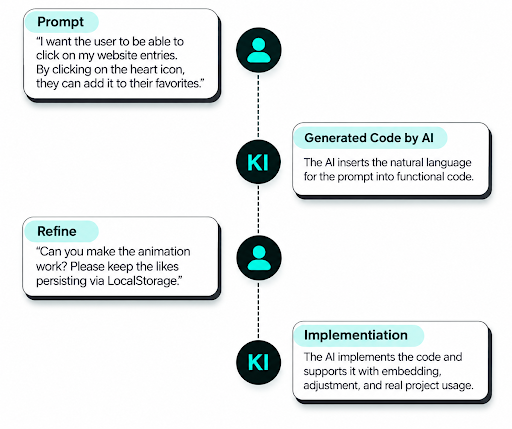
Software development is fundamentally about translating an idea into working code. The goal might be, for example, to add a specific function, such as a “Like” button, to an app. In traditional software development, the goal is achieved by developers writing the code for the application line by line in a specific programming language. With Vibe Coding, however, the code output is not generated by developers but by an AI assistant. Users describe the desired result, such as a “Like” button, and enter it as a prompt into the AI assistant’s dialog box.
Knowledge and application of programming languages are becoming less essential for some software development tasks, while prompting AI tools is becoming increasingly important. Instead of writing code, developers enter their desired outcome as a prompt in the AI assistant’s dialog box. Vibe coding thus shifts the focus of software development away from technology and toward intention.
Continue Reading: What Is Prompt Engineering? [Salary, Examples, and Types]
Vibe Coding vs. AI-Assisted Development
| Aspect | Traditional Development | AI-Assisted Development | Vibe Coding |
| Role of AI | No or limited use of AI | Assistant (e.g., code completion, debugging, documentation) | Equal, collaborative partner |
| Working Method | The developer writes code manually in an IDE | The developer writes code, while AI provides suggestions or explanations | Code is created through dialogue with humans and AI developing together |
| Interaction | The developer writes code manually in an IDE | Partly language-based (chat function in IDEs) | Natural language: Describe what you want instead of programming |
| Tools | IDEs such as VS Code, IntelliJ, Git, and compilers | IDEs and AI plugins (e.g., GitHub Copilot, Cursor) | AI dialogue platforms (e.g., ChatGPT, Replit, Windsurf, Claude) |
| Debugging | Manual debugging | AI suggests solutions | AI identifies, explains, and fixes errors through conversation |
| Documentation | Created manually | Partly automated | Generated automatically through dialogue |
Depending on the specific application of artificial intelligence, a distinction can be made between pure vibe coding and AI-assisted development. In AI-assisted development, the AI supports the human in programming, while in vibe coding, the human only formulates prompts. The AI generates the code based on the user’s instructions, while the user evaluates the results.
Vibe Coding
In its most advanced form, Vibe Coding lets you generate code without needing to know any programming language. The code is generated by a dedicated AI tool or a large language model (LLM). Users input a prompt, which the artificial intelligence translates into functional code. Here, users place complete trust in the AI regarding the coding process.
AI-Powered Development
In AI-powered development, the responsibility remains with humans. Large Language Models (LLMs) and corresponding tools like GitHub Copilot are used to provide targeted support. They serve as tools, for example, for debugging or code completion. Developers still write the code in an IDE (Integrated Development Environment), using AI specifically to increase efficiency.
Advantages and Disadvantages of Vibe Coding
Vibe coding in its purest form is particularly well-suited for rapid ideation and the development of initial prototypes, for example, in UX/UI design. Its advantage lies in the fact that no programming knowledge is required; instead, the code is generated during a natural conversation with the AI assistant. Vibe Coding can make software prototyping more accessible and faster for some tasks than traditional programming.
The disadvantage of vibe coding is that the AI largely controls the code. The code quality depends partly on the instructions provided, and users may not fully understand the code generated by the AI. In a professional context, vibe coding is primarily used for idea generation. In professional software development, developers must review, test, and understand AI-generated code before deploying it. The AI acts as a supporting tool. Responsibility for software development remains with the project’s developers. They are the ones who have full control over the architecture and who review, test, and understand the code.
Vibe Coding Tools
In a study, the American venture capital firm Y Combinator analyzed its portfolio companies. According to Y Combinator managing partner Jared Friedman, around a quarter of the startups in its Winter 2025 batch had codebases that were approximately 95% AI-generated.
The most important AI tools in software development include the following:
- LLMs like ChatGPT and Claude: In addition to specialized tools, general AI models like ChatGPT or Claude can also be used for dialogue-based coding. They support ideation, code generation, documentation, and error analysis.
- GitHub Copilot: Copilot suggests lines of code in real time, explains existing functions, and can interactively receive instructions via the Copilot chat.
- Replit: This is a cloud-based development environment with an integrated AI assistant that allows you to write, test, and modify code directly in the browser.
- Cursor: The tool provides an IDE that understands the project context and, based on that, refactors code, writes tests, or explains functions.
- Windsurf: This tool integrates into an existing IDE and enhances it with a dialogue-based AI assistant. It offers contextual code suggestions, integrated chat, and support for entire codebases, not just individual files.
- Lovable: An application that is particularly popular among product and UX designers. It allows users to create web or SaaS projects and prototypes using natural-language prompts and AI interaction.